# &#x20;Funding Your Phantom Wallet

#### **Buy Solana (SOL)**

1. **Open Phantom Wallet**: Once installed, click the Phantom icon on your browser. If you don’t have any SOL, click on "Buy."<br>

<figure><img src="https://3925340553-files.gitbook.io/~/files/v0/b/gitbook-x-prod.appspot.com/o/spaces%2FOdba6Ak2zkLDqYWqoCCA%2Fuploads%2F0FiewFafivUeejCuZSqA%2FScreenshot%20at%20Jan%2024%2020-07-39.png?alt=media&#x26;token=221aa4de-ba08-4cfd-bfb1-9a08492ffe45" alt=""><figcaption></figcaption></figure>

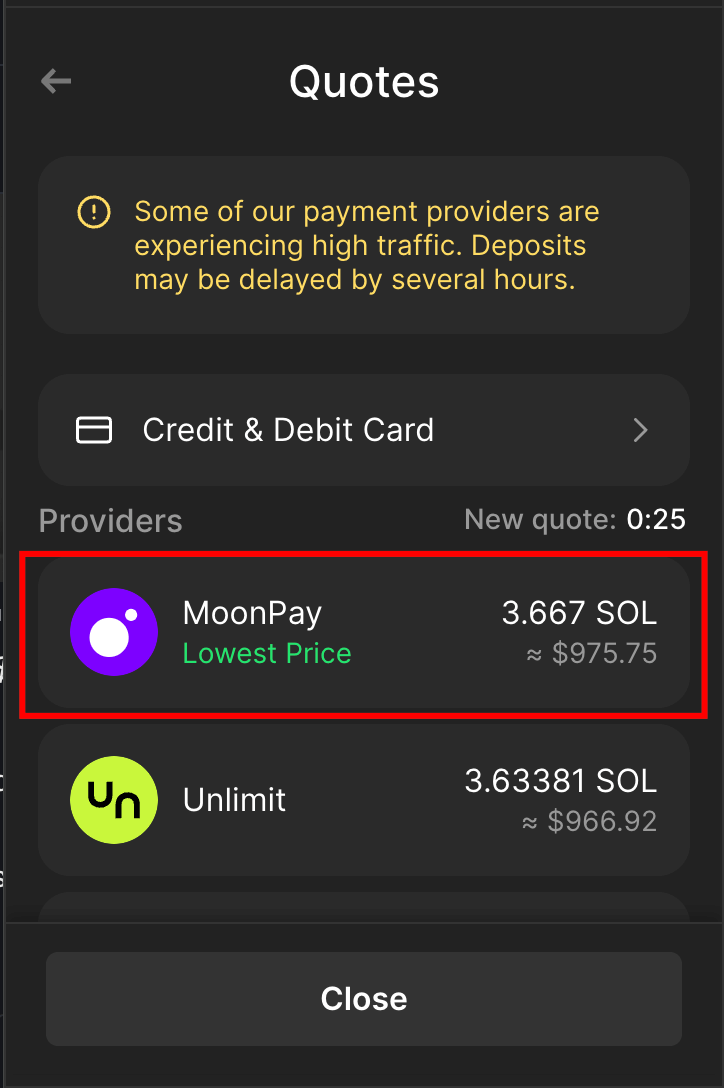
2. **Use MoonPay**: Select your desired amount (e.g., $1,000) and proceed to checkout using MoonPay — a secure crypto payment processor where you can enter your credit card details.<br>

<figure><img src="https://3925340553-files.gitbook.io/~/files/v0/b/gitbook-x-prod.appspot.com/o/spaces%2FOdba6Ak2zkLDqYWqoCCA%2Fuploads%2FfUxtguXCCy0miCxuq88I%2FScreenshot%20at%20Jan%2024%2020-08-54.png?alt=media&#x26;token=36f1a7c9-fb05-4b60-8748-8e7293129570" alt=""><figcaption></figcaption></figure>

3. Among all the payment options available in Phantom, MoonPay offers the lowest fees. However, the choice of payment method is entirely up to you and your preference.<br>

<figure><img src="https://3925340553-files.gitbook.io/~/files/v0/b/gitbook-x-prod.appspot.com/o/spaces%2FOdba6Ak2zkLDqYWqoCCA%2Fuploads%2F2ptyecckN7rIwBAAwQcB%2FScreenshot%20at%20Jan%2024%2020-09-23.png?alt=media&#x26;token=47663a27-67e9-4d44-8990-8b5bc4e38cdc" alt=""><figcaption></figcaption></figure>

**Complete Purchase**: After purchasing, the Solana will appear in your wallet.

Remember to keep your seed phrase safe and never share it. Now, you're ready to trade meme coins on Solana!